
To give yourself the best chance to perform as an archer, your quiver should only contain your best-grouping arrows. The process of identifying and selecting them is commonly called arrow culling.
The idea is simple, but it relies on a few things being true at the same time:
- You're shooting consistently.
- You can recognise bad shots and exclude them from analysis.
- You can plot enough arrows to see real grouping, not noise.
You can plot arrow groups with a pen and a paper target, or with an app like ArcherySuccess. With ArcherySuccess you can plot, assign arrow numbers (tags) to plotted points, and analyse your arrow groups - all from the Plot tab.
The five steps
1. Weigh your arrows
Arrows in the set should be the same weight and configuration. Cull anything that's mechanically different before you even start.
2. Number each arrow
Write a unique number on each arrow shaft, or use numbered arrow wraps. ArcherySuccess supports arrow numbers from 1 to 24.
3. Shoot, plot, and tag each arrow
Plot each arrow on the Plot tab, then tag it with its number. The tag links each plotted dot back to a physical arrow you can pick up and inspect later.
⚠️ Wayward arrows from bad shots should not be tagged - they don't reflect the arrow's true behaviour, and tagging them muddies the analysis.
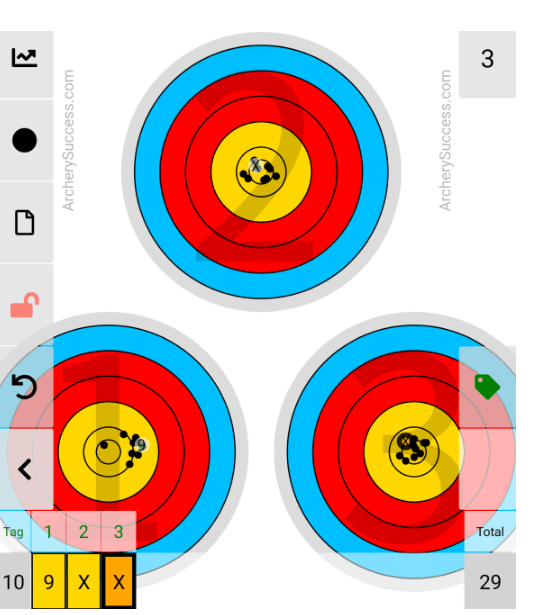
For the in-app mechanics see How do I Tag an arrow? on the Support page.
4. Build up a meaningful sample
Repeat step 3 until you're confident the plots reflect each arrow's behaviour, not the variance of one or two bad shots. The more ends you log, the clearer the signal.
5. Run a Plot Analysis
Use Plot Analysis to see where each tagged arrow groups relative to the "all arrows" group. Arrows that don't group with the rest, or consistently group to one side, are the candidates to investigate, adjust, or cull.
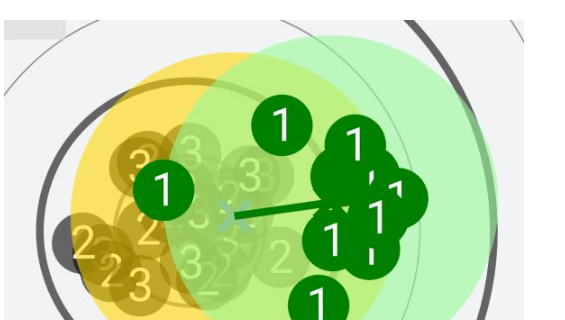
For the in-app mechanics see How do I do Tag Analysis? on the Support page.
Why it works
Tagging makes the plots identifiable. Without tags you have a cloud of dots; with tags you have a labelled cloud, and the labels carry back to physical arrows you can re-examine, re-fletch, re-weigh, or replace. Plot Analysis turns that into a visual comparison so outlier arrows jump out - making the cull decision evidence-based rather than gut-feel.
What to do with the outliers
Once you've identified an arrow (or two) that consistently doesn't group:
- Check the basics first - straightness, weight, spine, nock, fletching, point weight, inserts.
- Mark it so it doesn't go back in the rotation until you've fixed or replaced it.
- Re-test after any adjustment by running another round of tagged plots; the same arrow should now group with the rest, or you've found a deeper problem.
For other plotting and analysis topics, see the Plotting feature page, the Support page, or contact us - we typically reply within 48 hours.